Amanuensis: the free writing app for novelists

New in 1.4 Research boards within boards, linked together For Mac · Free

Supports you from initial idea
to published paperback.

Amanuensis helps you shape your novel's plot, write it scene by scene, check it against the structure you intended, and publish it.

macOS · No account · No subscription · No AI

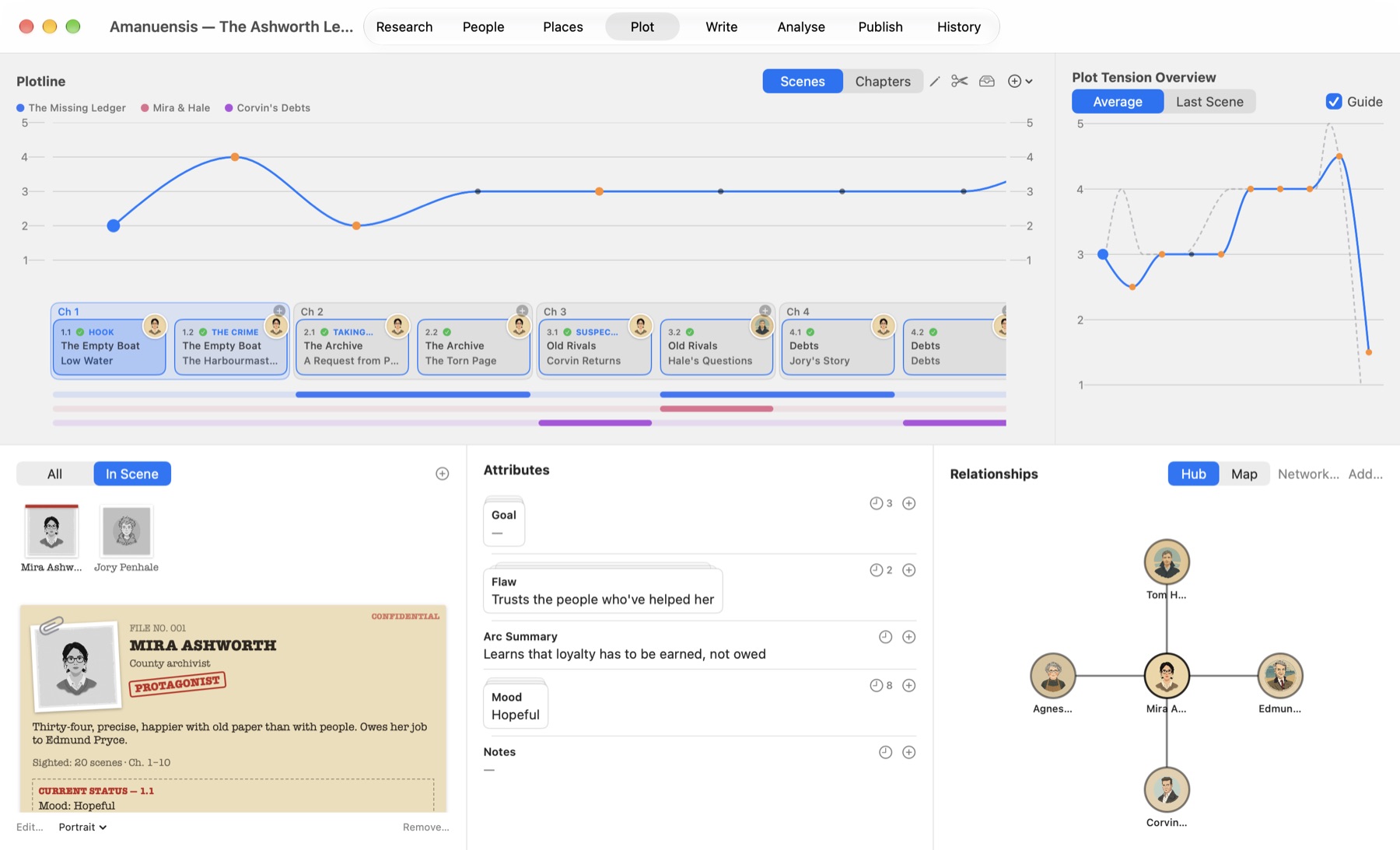
Amanuensis in Plot mode: a tension line rising and falling across the scenes of The Ashworth Ledger, with subplot lanes, a character's dossier and their relationships.
Plot mode, with the Sample Book: The Ashworth Ledger
Why use Amanuensis?

Supercharge your writing with a completely free app.

Created by an author, for fellow authors, Amanuensis is dedicated to helping you write your very best book, then prepare it for publishing on Amazon KDP and beyond.

It gives your writing structure and support, while leaving you the latitude to create your book, your way. And did we mention? It's completely free.

A look around

Eight modes, from first idea to finished book.

Every screen below is the real app, with the Sample Book that comes with it: The Ashworth Ledger, a short mystery.

Plot mode
Everything in one place

Eight modes, one book.

Most writers juggle an outliner, a spreadsheet, a word processor and a formatting tool. Amanuensis covers them all, and keeps them in step: move a scene and its text, notes and analysis move with it.

1

Plot

Lay out chapters and scenes on the Plotline and watch your book take shape.

  • Tension per scene, against a selected structure model or your own curve
  • Structural beats, subplots and locations
  • Planted evidence and Chekhov's guns
  • Paste an outline, or sketch a mind map in Roughout, and get chapters in seconds
2

Write

Write each scene in a focused editor, beside everything you know about it.

  • Scene text, synopsis and notes together, with each character's mood and goals as they change
  • Names and clues marked in your text, with a card for each
  • Writing aids: where the last scene left off, echoes, crutch words, and check-ins against your plan
  • Point-of-view slips, stray quotes, extra spaces and doubled words marked as you type, each fixed in a click
  • Spell checking, focus mode and a scratchpad
  • A goal for today, and the words a day to reach your finish date
3

Analyse

Check the book you wrote against the book you planned.

  • A report with findings for your genre
  • The whole book at a glance, and patterns across it
  • Beat placement, early or late, and words against your target
  • Every character's arc, and whether you're keeping up with their mood
  • Screen time and who's underused
  • Every clue from plant to payoff, and whether your text delivers it
4

Publish

Export a book ready to upload, with front and back matter laid out for you.

  • EPUB ready for Kindle Direct Publishing
  • Paperback PDF at 5×8 to 6×9 inches
  • Title page, copyright, contents and more
  • Running heads, page numbers, chapters on the right
  • A live preview of the paperback and ebook, page by page
  • Your store listing kept to hand: a KDP-ready description, keywords, links, and a reminder before KDP Select renews

And everything your story rests on

Research

A board for ideas, facts, pictures and web pages, tied together with string.

People

Your cast in families, factions and organisations, with a web of who's who and who belongs where.

Places

Maps and plans with your places pinned on them, and a movie of your cast moving across them.

History

Words a day, streaks and milestones: the story of your book being written.

Exports to EPUBPDFWord .docxRTFScrivener .scrivOPML for when you want finer control over the final layout.
Your first novel

Built for your first book.

Start with a genre and a structure, not a blank page. Amanuensis keeps track of the things that are easy to lose in a long book: every clue you've planted and where it pays off, every red herring, every character's mood and motive, scene by scene. It shows you where your story sags and where it races.

Set a finish date and it works out the words a day that will get you there. When you're done, it checks the book is ready to publish, shows you the paperback and the ebook page by page, and exports both, ready for Amazon KDP.

The Ashworth Ledger — Ready to Publish?
  • Title: The Ashworth Ledger
  • Author: A. N. Author
  • Cover: 1600 × 2560 px
  • Every scene has text
  • No placeholders left in the text
  • 1 clue is never paid offSilas's letter
  • Copyright page
Advice, never a gate: you can always export anyway.
Free

Every feature, no catch.

There's no trial, no subscription and nothing to unlock.

Your words

No AI, anywhere.

Amanuensis never writes, rewrites or suggests prose, and Apple's Writing Tools are switched off too. Every word in your book is yours.

Your files

Stays on your Mac.

Projects are ordinary files you can back up, copy and keep. Amanuensis saves as you go and keeps backups, and every book holds a plain copy of the manuscript that opens without it. Nothing is uploaded and you never need an account.

Videos

How to do it in Amanuensis.

Short videos, each showing one task from start to finish. They open on YouTube.

Support

Questions and answers.

Is Amanuensis really free?

Yes. Every feature is included. If it helps you finish your book and you'd like to say thanks, there's a Buy Me a Coffee link at the bottom of this page.

Can I publish straight from Amanuensis?

Yes. Publish mode shows the paperback and the ebook page by page, checks the book is ready, and exports an EPUB for Kindle Direct Publishing and a PDF for the paperback. Its tabs take you through it in order: Book Details (title, cover, trim size and typeface), Front & Back Matter, Preview, Export, and Listing, which keeps everything the stores ask for.

I've already started my book. Can I bring it in?

Yes. Writing ▸ Import Your Writing brings in a book from Word, Pages or Scrivener as chapters and scenes, each with its text. Your original documents are never changed.

I already use Scrivener. Can I move my book there?

Yes. Export ▸ Scrivener Project creates a complete project with your scene text, synopses, notes and a document for each character and location.

Where are my projects saved?

Wherever you choose. Each project is a single .aman file on your Mac, so Time Machine and iCloud Drive back it up like any other document.

Which Macs does it run on?

Any Mac that runs the current version of macOS.

Privacy

Amanuensis collects nothing.

It has no analytics, no tracking, no advertising and no account. Your projects stay on your Mac and are never sent anywhere.

The only time it uses the internet is when you open a link, such as a video on this page.


Found a problem or have an idea? Email me. I read every message, but as a one-person project I can't always reply, so please check the questions and videos first.